
What A Crypto Wallet Does
Hey, if you hold any crypto, you need a place to keep it. A crypto wallet is just a digital cryptocurrency wallet (yes that's a real phrase) that lets you store, send, and get digital coins. I like to think of it like a browser for the internet. The browser makes the web easy to use, and a wallet makes the blockchain easy to use. Without one, you'd stare at raw code and keys all day. The wallet hides the hard parts.
Your wallet works a bit like a normal bank account, except it's not a bank and it's way more scary. You have a login, which is your private key. If you give someone your routing number, which is the public key, they can send you money. But you should never share the private key. That key is the only way to get into your account. Lose it and you lose the coins. Share it and someone else can take them. So the wallet's job is to guard that key while letting you move funds. A good wallet keeps the key safe and shows you what you sign.
Why Hardware Wallets For Crypto Matter
I got a bit paranoid when my crypto pile grew. The hardware wallets for crypto keep your private keys offline. That means a hacker on your computer can't just grab them. A software wallet stays online and faces more threats. The hardware kind is a physical thing you hold. It sits apart from the net. The main word here is safety. You own the keys, not some company. That non-custodial setup means only you control your coins. If an exchange goes bust, your coins on their wallet may vanish. With your own hardware device, they stay with you.
These devices are a kind of cold storage. They generate and store keys offline. That limits exposure to malware and phishing. But you still connect to sign. The trick is the key never touches the connected machine. I sleep better knowing my big bag is on a gadget in a drawer. You don't need a computer science degree to use one. You just need to read the screen and press a button.
Cold Vs Hot Vs Hardware
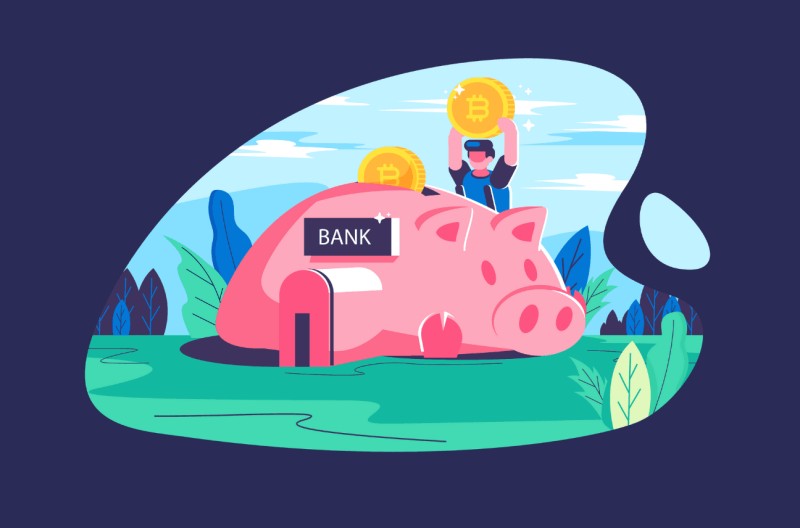
Let me break down the types so it's clear. Hot wallets are apps like MetaMask or Rainbow. They run on your phone or browser and stay online. Cold wallets are anything not connected to the net. Hardware wallets are a subset of cold wallets, built as dedicated gadgets with a screen and secure chip. They mix the safety of cold storage with a way to sign without leaking keys.
Quick type list
- Hot wallets - always online, easy but exposed to threats
- Cold wallets - offline media or devices, less convenient
- Hardware wallets - dedicated device with secure chip and screen
The hardware kind lets you sign transactions while keeping the key hidden. That's the sweet spot for a large bag. You get some convenience without smoking your security. A hot wallet is fine for ten bucks of play money. But for a fat stack, cold is king. I keep most of mine on hardware and a little on hot for quick spends. The split helps if one key gets lost.
BBC breaks down what a hardware wallet actually does
How A Hardware Wallet Signs Transactions
So how does the thing actually work? I'll walk through a typical flow. You plug or pair the device to your computer or phone. The companion app shows a transaction you want to make. The app sends the unsigned details to the device. The device shows the same info on its own screen. You check it, then approve with a PIN or button. The device signs with the key stuck inside the chip. The signed blob goes back to the host, which broadcasts it. The host never sees the key.
Steps I see on my device
- Connect via USB, Bluetooth, or NFC
- App creates an unsigned transaction
- Device screen shows the exact details
- You press button or enter PIN to confirm
- Secure chip signs with private key offline
- Signed data goes back to host
- Host broadcasts to blockchain, key never leaves
The key point: the private key stays inside the device. The computer never sees it. That's why I trust this method for big amounts. Even if your laptop is full of viruses, the key stays locked in the gadget. You just have to trust your own eyes on the small screen. Read the address. Read the amount. Then sign.
Parts Inside The Device
What's under the hood? There's a computer chip that makes and stores your keys. Often it's a secure element like the ones in credit cards. That chip is built to resist physical attacks. Then there's a small OS that manages keys in a locked space. It never lets the host read them. Some budget wallets use a plain microcontroller and rely on firmware alone. The secure element is stronger against side-channel hits.
And you get a screen plus buttons. This interface lets you check what you're signing. Without it, you're blind. I'll touch on that later. The screen is not a luxury. It is the whole point of a hardware wallet. If you can't see the transaction, you are just trusting the computer, and that defeats the purpose. A good device shows the receiver address and the amount in clear text.
Good And Bad Sides Of Hardware Wallets
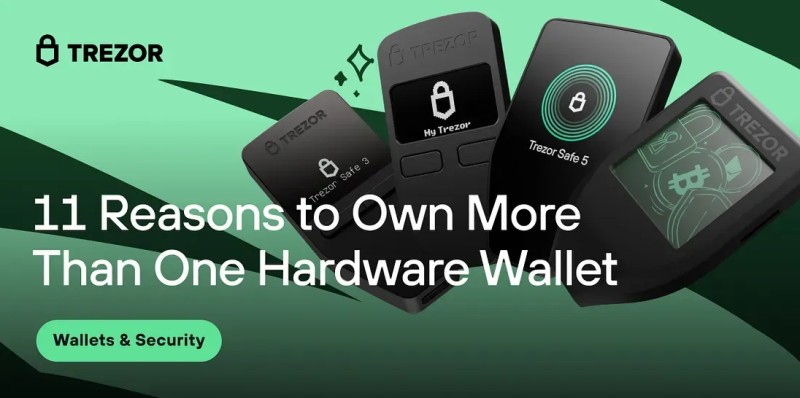
Nothing is perfect. Let's list the pros and cons so you can judge. The pros are strong: you control keys, remote hack is hard, one device holds many coins, offline signing, and seed backup. The cons are real too: you pay up front, it's less handy than a phone app, and it's not built for daily small buys.
Pros I like
- Control - fully non-custodial, you own keys
- Max security - keys never leave device
- Multiple accounts and chains on one gadget
- Offline signing keeps key hidden
- Seed phrase backup restores on new device
Cons to weigh
- Up-front cost - usually $50 to $200
- Less convenient than hot wallets for daily use
- Not great for frequent small spends
If you just trade tiny amounts, a hot wallet might do. But for a fat bag, the cost is worth sleep. I'd rather pay once than lose everything. The setup takes a few minutes. After that, you sign by plugging in. It's a small friction for a big safety win. Think of it as a safe for your coins, not a checking account.
Three Bitcoin-only wallets plus a beginner bonus reviewed
How To Pick The Right One
When I shopped for the best crypto wallets hardware (the kind you can hold) , I used a set of checks. You want a most secure hardware wallet (i.e. the one that won't betray you) that fits your brain. Security features matter: 2FA, multi-sig, secure element, tamper packaging, good recovery. A clear screen and simple buttons keep you from mistakes. Open code lets the crowd check for backdoors. Coin support must match what you hold.
Seven checks for a good pick
- Security features - 2FA, multi-sig, secure element, tamper pack
- Interface - clear display, simple buttons, easy app
- Open-source or audited code - community can review
- Supported currencies - covers your coins and tokens
- Platform compatibility - works with your OS and apps
- Reputation - maker has track record, fixes issues
- Reproducible code - testers verify firmware matches source
Don't skip the screen check. A clear display helps you verify sends. And if you hold weird tokens, make sure they are on the list. Some wallets focus on Bitcoin only. Others handle Ethereum, Solana, XRP, Tether, and many more. Pick what fits your mix. Also check if it works with your phone or laptop OS. No point buying a thing you can't plug in.
Why Own More Than One Device
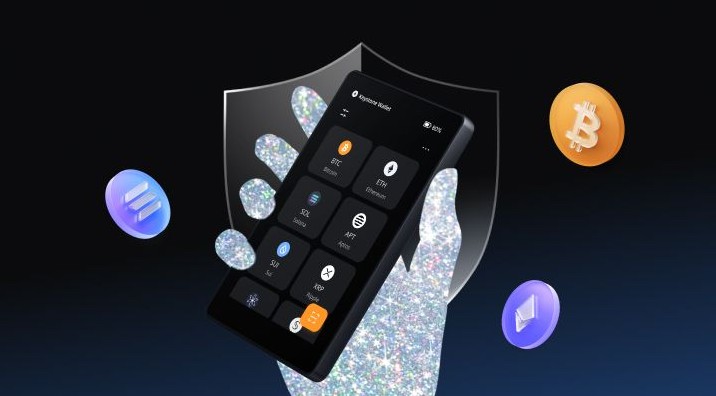
One gadget might not cut it. The source gave eleven reasons to have a backup. I'll sum a few that hit home. You can keep a second in safe storage, gift one, or use a Bitcoin-only device. A trading wallet can stay handy while a cold one hides. Diversifying across devices cuts risk. If one fails, you still have the rest.
Reasons to buy a second hardware wallet
- Extra backup for peace of mind if primary lost
- Gifting to friends so they start self-custody
- Bitcoin-only device to separate from altcoins
- Trading wallet vs cold storage wallet split
- Stay diversified across devices
- Inheritance to family or executor
- Business funds separate from personal
- Travel wallet with small amount
- Fun collecting newer models
- Teaching demos without real funds
- Multisig security needing multiple devices
I keep a spare in a safe spot. If my main device dies, I'm not locked out. That's a simple way to cut risk. A second device can also help with multisig. You sign with two or three gadgets. One lost phone won't sink you. For travel, I carry a small balance on a cheap device. If it's stolen, the loss is tiny. The home wallet stays put.
Brands I Looked At
There are many makers. Tangem is based in Switzerland and offers non-custodial wallets. Some people search arculus vs tangem wallet (a fight I won't pick) but I just note Tangem never holds your assets. Trezor made the Trezor One back in 2014 and now has Model T and Safe series. how does trezor wallet work (it's not rocket science) is easy: open-source firmware, passphrase, multi-sig. Ledger uses secure element and Bluetooth. KeepKey has a large screen and open code.
Keystone is air-gapped with three secure chips and wipes on tamper. You might hear of ngrave crypto wallet (never met one) or a d cent cold wallet (sounds like a typo) in forums; those are other best cold wallets for cryptocurrency (the offline gang) options folks mention. Loopring is a smart wallet with guardians and 2FA, not a typical USB gadget but worth knowing. I'm not paid by any brand. I just read specs. Pick what matches your coins and your comfort with tech.
Makers and notes
- Tangem - non-custodial, supports many tokens, no exchange
- Trezor - open-source, passphrase, clear display
- Ledger - secure element, Bluetooth, Ledger Live app
- KeepKey - big display, ShapeShift swap, open firmware
- Keystone - air-gapped, SLIP-39, tamper wipes data
- Loopring - smart wallet with guardians, 2FA, limits
I like that Tangem does not act as a financial service. They just give you the tool. Trezor's long track record since 2014 builds trust. Ledger's Bluetooth is handy but some worry about the radio. KeepKey's big screen is nice for old eyes. Keystone's tamper wipe is a neat trick. Loopring's guardians let you recover without a paper seed. Each has a place. Your job is to match the tool to your brain.
Extra Security Tricks
Beyond the device, you can add layers. A BIP-39 passphrase is like a 25th word. Even if someone finds your seed, they can't open the wallet without it. Use a long random phrase, not your dog's name. The 25th word uses PBKDF2 with 2048 iterations, a low count by modern standards, so a weak phrase can be cracked if the seed leaks. Pick high entropy.
Advanced features to know
- BIP-39 passphrase - extra secret word
- Multi-signature - needs several keys to sign
- Social recovery - trusted guardians help restore
- Two-factor auth - TOTP or SMS step
- Address whitelisting - only approved receivers
- Daily transfer limits - cap moved per day
- Cloud recovery - encrypted backup in iCloud etc
- Tamper-proof tech - erases on case open
- Biometric unlock - fingerprint or face
Multisig is strong for big holdings. You split keys across devices. One lost device won't sink you. Social recovery uses people or devices you trust. If you lose access, they approve a reset. Address whitelisting stops sends to strange addresses. Daily limits cap damage from a hacked device. Cloud recovery encrypts your key with a passcode you pick. Tamper tech wipes the chip if someone opens the case. These are tools, not magic. Use what fits.
Myths That Trip People Up
I used to believe a hardware wallet made me bulletproof. Not true. It protects keys from remote leak, but you still sign. Phishing tricks you into signing bad stuff. Kevin Rose lost $1.1M in NFTs in 2023 by signing a malicious message. Always verify on screen. A secure element is good but closed code can still lie. Air-gapped QR is not auto safer than USB. The firmware matters more. Card wallets with no screen force blind signing. Attestation only proves the firmware is signed, not that hardware is clean.
Common myths busted
- Myth: hardware wallet means immune to hacking
- Myth: secure enclave alone means safe
- Myth: air-gapped QR is always better than USB
- Myth: card wallets without screens are equal
- Myth: device attestation proves no tamper
Never trust a signing prompt you cannot read.
Open-source firmware lets the crowd check for bad code. That beats a closed box. And a device with no screen makes you trust the host, which defeats the point. Attestation is fine but it won't catch a extra chip soldered inside. Physical tamper marks or meshes are what really help. So don't believe the hype. Read the screen, check the source, and keep your seed offline.
Hot vs cold wallet decision tree with two concrete picks
Where Losses Really Come From
The data shows most losses are from phishing and blind signing, not physical attacks. User mistakes dominate. Strong habits beat fancy chips. A visual summary from the source points to key-management errors as the top vector. That means you, me, and the guy next door cause more loss than any laser fault attack.
Phishing / blind signing and key-management errors dominate over physical attacks on the secure element.
So the best way to keep your crypto safe (spoiler: not panic) is to slow down. Read the screen. Use guardians or multisig. That's the real shield. A hardware wallet is a tool, not a spell. If you sign a bad message because you panicked, the device did its job and you still lost coins. Take a breath. Check the address. Then press.
Smart Wallet Features
Some newer wallets blend hardware with smart contracts. Loopring offers social recovery and 2FA. People call it the safest online crypto wallet (oxymoron?) for its guardian model. It lets you pay gas with any token. That cuts the need to hold native coins just to move. Multi-network support grows. You can hold BTC, ETH, SOL, and more without extra apps.
DeFi and NFT access get bundled while keeping keys safe. Physical security like biometric locks spreads too. Social recovery is becoming a standard for folks who hate paper seeds. Account abstraction lets the wallet do tricks like daily limits built in. This is not sci-fi. It's here now on some platforms. I watch this space because it may help non-tech friends self-custody without fear.
Keeping Your Big Bag Safe
If you got a fat crypto bag, don't put all in one spot. Use both cold and hot wallets. This improves privacy and risk management. Lose one key, not all. The source says putting a lot in one wallet is risky. Most people should use both cold and hot. That way a lost key doesn't freeze your whole life.
Update firmware when makers patch holes. Keep a seed phrase plus a second device. And learn how phishing works. That cuts costly mistakes. I set a reminder to check for updates every few months. It's boring but it beats losing coins to a known bug. Backup your seed on steel if you can. Paper burns. Steel doesn't.
My Take On Screens
I insist on a screen. A card-style wallet with no display makes you sign blind. You can't check the address. That's a no from me. The source says no screen equals trust the host. That throws away the main benefit. Spend a few more bucks for a display.
The screen is your last line of defense. If the computer lies about where the money goes, the screen tells the truth. A tiny screen is fine. You don't need color. You need numbers and letters you can read. I've seen folks buy sleek cards and then regret it when they couldn't verify a send. Don't be that person.
Seed Phrases And Backups
Your seed phrase (BIP-39) restores everything. Write it on paper or steel. Keep it offline. SLIP-39 splits into parts for multi-secret recovery. That means you can give shards to friends and no one alone can steal your coins. A high-entropy passphrase adds another layer. Don't use a birthday.
Backup intelligently. A seed phrase plus a secure cloud backup or secondary hardware device ensures you can recover even if one fails.
I store my phrase in a safe. My backup device sits elsewhere. That's my plan for hardware wallets for crypto peace of mind. If my house burns, I have the seed offsite. If I lose the device, I have the spare. The key idea is redundancy without putting all eggs in one basket. You don't need to be a pro. You just need a plan and the guts to follow it.







Comments on “How to pick the right hardware wallets for crypto so your large pile doesn't evaporate”
No comments yet. Be the first to share your thoughts.