

What Private Key Encryption and Public Key Encryption Mean
When I first heard about private key encryption and public key encryption, I assumed they were two rival gangs fighting to be the one true way to hide data. They’re not. They’re more like two tools in the same toolbox that happen to fit together perfectly. Private key encryption uses one secret key to both lock and unlock. Public key encryption uses a pair: a public key you can throw around to anyone, and a private key you guard like a crazy person. Both are doing the same job-keeping your stuff safe on the chaotic open internet.
The short version: private key encryption and public key encryption are complementary. One is fast but requires a safe way to hand off the key. The other lets any random person lock a message, but only the owner can open it. Together they deliver confidentiality, integrity, authentication, and non-repudiation-which is a ridiculous mouthful that just means we can trust both the data and the person who sent it. I usually explain this to friends as a mailbox that takes two different keys, because that’s the kind of analogy that sticks after two drinks.
Public key encryption lets you set up secure channels and prove who you are without needing to share secrets ahead of time, while private key encryption brings the fast, heavy-duty confidentiality for big piles of data.
How Public Key Encryption Works
Public key encryption is built on a matched pair of keys born from math. The public key can be handed to literally anyone-posted on a billboard if you want. The private key stays secret with its owner. If you lock data with the public key, only the matching private key can unlock it. The neat reverse also works for signing: a message signed with the private key can be verified by anyone holding the public key. That two-way trick is exactly what lets two strangers trust each other without ever meeting in a dark alley.
Common public key methods
- RSA - the oldest widely used algorithm for encryption and signatures (the grizzled veteran)
- DSA - a standard for digital signatures only, not encryption (so don't try to lock stuff with it)
- ECC - elliptic curve math that gives strong safety with small keys
- Diffie-Hellman - a clever way to agree on a shared secret over open channels without anyone catching on
Key generation relies on one-way math functions like modular exponentiation or elliptic-curve multiplication. The cool part-the part that feels like magic-is that you can’t feasibly reverse-engineer the private key from the public key. That’s why it’s totally fine to slap your public key on a server for the whole world to see. I love this idea because it deletes the awkward need to meet in person and whisper secrets. The math does the trust-building for us, which is weirdly wholesome.
In real life, modern RSA keys are usually 2048 bits or larger. ECC can deliver the same level of safety with a 256-bit key, which is laughably tiny in comparison. That size gap matters a lot for phones and other dinky devices. Whenever I’m reading specs, I check the key sizes first because they tell me how heavy the math luggage is going to be.
Asymmetric encryption explained simply
A Simple Email Example
Let me paint the classic picture with Bob and Alice (the default cartoon citizens of crypto). Bob wants to send Alice an encrypted email. He looks up Alice’s public key and uses it to encrypt the message. Now the text is scrambled into nonsense. Only Alice has the matching private key, so only she can decrypt it. When she replies, she does the exact same dance with Bob’s public key. Easy and safe. This is the backbone of every end-to-end mail tool you’ve ever used.
Only Alice, who possesses the matching private key, can decrypt the ciphertext.
I find this Bob-and-Alice example helpful because it shows the split so clearly. Bob doesn’t need to ship a secret key to Alice ahead of time like some spy movie courier. He just uses her public info. That removes a giant headache from secure mail. If you’ve ever set up a secure email app, you were doing exactly this key dance without realizing it.
How They Team Up In Hybrid Encryption
Most real systems are not loyal to just one method-they mix them. This is called hybrid encryption. A typical flow: first, a symmetric session key is generated (something like an AES-256 key). Then that session key gets locked up with the recipient’s public key. The actual bulk message is encrypted with the symmetric key. Both pieces are sent. The receiver uses their private key to free the session key, then decrypts the message. This pattern shows up almost everywhere, like, embarrassingly often.
Systems that use hybrid encryption
- TLS 1.3 - the backbone of secure web browsing (aka why your browser has that little lock)
- JSON Web Encryption (JWE) - a standard for encrypted JSON data, for when you need your JSON sneaky
- Hybrid Public-Key Encryption (HPKE) - a newer, modular construction that’s pretty elegant
- Noise framework - uses slick one-way handshake patterns for secure channels
HPKE is neat because it splits the job into three parts: a key encapsulation mechanism (KEM), a key derivation function (KDF), and authenticated encryption (AEAD). This lets engineers swap pieces out without rewriting the whole shebang. So private key encryption and public key encryption share the load-public does the key exchange pleasantries, private does the heavy lifting on the actual data. I appreciate that clean division of labor, like a good marriage.
There’s also Diffie-Hellman key agreement, which builds a shared secret from public keys on both sides. It feeds that secret into a KDF to spawn a symmetric key. This is the core of many one-way handshake patterns. Whenever I spot “ECDHE” in my browser’s specs, that’s this idea quietly keeping my session fast and safe.
Private Key Encryption Basics
Private key encryption-also called symmetric encryption-uses a single secret key for both locking and unlocking. You generate a random secret, like a 256-bit AES key. That key must stay hidden like your diary. The plaintext gets transformed into ciphertext using that secret and an algorithm such as AES-GCM or ChaCha20-Poly1305. The same key reverses the step on the other end, like a bidirectional door.
Steps in symmetric encryption
- Key generation - make a random secret and protect it like your life depends on it
- Encryption - turn plaintext into ciphertext with the secret (abracadabra)
- Transmission - send the ciphertext over the wire (hopefully not intercepted)
- Decryption - use the same secret to reverse the process and pray the key didn’t leak
The big headache is key distribution. Since both sides need the same key, you have to get it to them without some middleman snatching it. That’s why we often use public key encryption to ship the symmetric key safely. It closes the loop nicely. I like to think of it as putting a small key inside a locked box that only the receiver can open with their private key.
Algorithms like AES-GCM and ChaCha20-Poly1305 also protect integrity, not just secrecy. That means if some jerk tampers with the ciphertext, the receiver will know immediately. This is a big deal for data sitting on a disk or flying across the internet. When I store files locally, symmetric encryption is my go-to because it’s fast as hell.
Public/private keys for signatures and key exchange
Keeping Keys Safe
Keys are the crown jewels. If a private key leaks, the game is instantly over. So storage matters a ton. Never keep keys in plain text files like a barbarian. Hardware security modules or key vaults give tamper-resistant storage. Rotation means changing keys periodically so a stolen key has limited blast radius. Good habits here save you from real bad days.
Key management best practices
- Storage - use HSMs or vaults, not flat files (flat files are for chumps)
- Rotation - renew keys often through automated lifecycles so thieves get little
- Policy and logging - role-based access and auditable trails (cover your ass)
- Revocation - short-lived certs avoid complex revoke lists (just let them die)
- Backup and recovery - secure copies so you never lose data forever
Some standards push for ridiculously short certificate lifespans, like 47 days, to force automation. That might sound strict, but it makes revocation simpler. If a cert expires fast, you just wait it out instead of maintaining heavy reject lists. I think that’s a calm way to handle risk. Losing a key permanently locks your data, so backups are absolutely not optional.
Compliance rules like GDPR, HIPAA, and PCI-DSS ask for access controls and logs. A good vault gives you that without much fuss. When I set up a small service, I use a managed key store because rolling my own is a recipe for disaster. The source material warns that plain text key files are a hard no-go, and I couldn’t agree more.
Public Key Infrastructure And Certificates
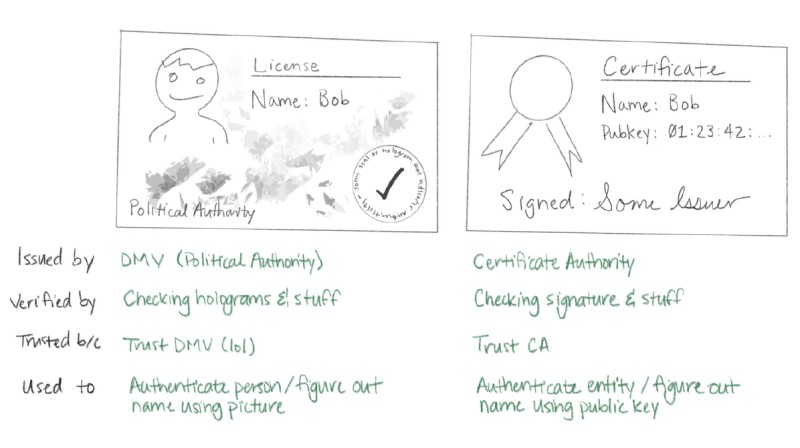
A certificate is a signed bundle that ties a name (like a domain or email) to a public key. A certificate authority (CA) vouches for that binding-like a notary for math. When you get a cert, you check the CA’s signature using a trusted root stored in your system. This is the web of trust behind HTTPS. Without it, public keys would be stupidly easy to fake.
Core PKI ideas
- Entity - any user, device, or service that holds an identity
- Identity vs identifier - attributes versus a unique reference (subtle but important)
- Subscriber or end-entity - the one receiving a leaf certificate (the little guy)
- Relying party - the one using the cert to authenticate or encrypt (the trusting soul)
Certificate formats matter too, annoyingly. X.509 v3 is the default for browsers, encoded in DER or PEM. PKCS#7 can carry a full chain, and PKCS#12 holds a private key alongside the cert. When I install a cert on a Windows box, I usually meet the PKCS#12 type with a .pfx ending. Knowing these shapes helps a ton when debugging a handshake that’s gone sideways.
How Certificates Get Made And Checked
To get a cert, you first make a certificate signing request (CSR) with your public key and a signature from your private key. The CA then proves you actually control the name, maybe via HTTP or DNS challenges. After that they sign and issue the leaf cert. Renewal is just getting a fresh one before expiry. The workflow looks simple on the surface but is strict underneath, like a bouncer.
Chain validation checks
- Validates each signature up the chain to the root (no broken links)
- Checks validity periods so expired certs get the boot
- Revocation status via lists or online checks (are you on the naughty list?)
- Intended usage like server auth or code signing (use it or lose it)
Hey, don’t skip this part: turning off validation (like using curl -k) is a bad move. Encryption without authentication is effectively useless because an attacker can just pretend to be the server. I always keep validation on, even for quick tests. It’s the difference between a locked door and a flimsy curtain.
Disabling this validation is strongly discouraged because encryption without authentication is effectively useless.
Passive revocation-which just waits for expiry-is the simplest path and is replacing active lists. Short-lived certs make that work. When I run internal services, I issue short certs from my own CA so I never fuss with revoke servers. It keeps the setup small and sturdy, which I like.
Where You See This In Real Life
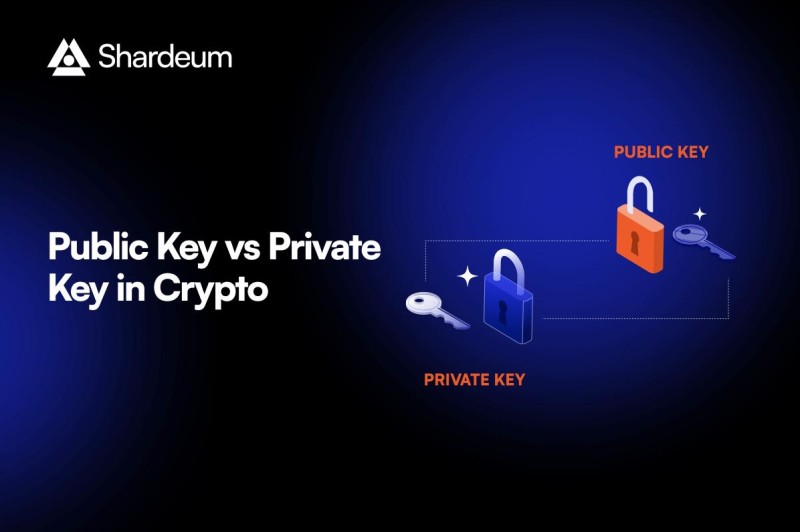
You meet these systems daily without thinking about it. Secure email apps use end-to-end hybrid schemes. Web transport relies on TLS. Enterprises run key management platforms. And blockchain uses public keys as addresses and private keys to sign transactions. This is where crypto wallets come in. The exact same math that protects my bank login protects coin transfers.
Real-world implementations
- Secure email - hybrid ECC encryption right on your device
- Web transport security - TLS 1.3 with AES-GCM records (the lock icon)
- Enterprise key management - vaults with auto rotation so humans don’t screw up
- Blockchain and cryptocurrencies - keys sign and address funds (the whole point)
- File sharing - double encryption layers with user keys for extra paranoia
- Cloud storage - envelope encryption with master keys in HSMs (Fort Knox style)
If you use a digital cryptocurrency wallet , your public key shows up as your crypto currency wallet address . The best way to keep your crypto safe is to use a most secure hardware wallet or check best crypto wallets hardware . I once went down a rabbit hole reading about how does trezor wallet work and also the ngrave crypto wallet . There are plenty of hardware wallets for crypto out there, and picking a reputable crypto wallet is not something to half-ass. Some folks compare arculus vs tangem wallet when shopping. All of this quietly rests on private key encryption and public key encryption doing their unglamorous job.
The blockchain case is a crystal-clear window into the topic. A public key becomes your receive address; a private key signs the spend. If the private key is lost, the funds are locked forever-no customer support line to call. That’s why a reputable crypto wallet and a solid backup matter. I never keep large amounts on a hot device. The split between public and private keys is the whole game, basically.
Computerphile's take on public key cryptography
Threats To Watch Out For
No system is perfect, because nothing is. A man-in-the-middle attack can swap a public key if a CA is compromised. Brute-force attacks target weak keys like old 1024-bit RSA. Key compromise means someone got the private key, and quantum computers could someday break RSA, ECC, and DH math. Forward secrecy helps by using ephemeral keys so past sessions stay safe even if later hacked. I sleep better knowing my chat app uses that.
Main threats
- Man-in-the-middle - fake keys via bad CAs (the classic sneak)
- Brute-force attacks - factoring weak keys with brute computer power
- Key compromise - exposed private key means game over
- Quantum computing - Shor's algorithm breaks current math (future headache)
We can fight back with certificate transparency, strict path validation, and moving to post-quantum algorithms. It’s a slow shift, but it’s happening. I keep an eye on it because my own data rides on these protections. A leaked key is like a lost house key, except you might not notice until a thief has already moved in.
Brute-force is less scary with big keys. Industry standards now ask for 2048-bit RSA or equivalent ECC. That pushes attackers to need ridiculous resources. Still, the quantum risk is real, so new math is being standardized as we speak. I mention this not to scare you but because planning ahead is just smart.
Choosing Which One To Use
Use public key encryption when you need to talk to strangers safely, prove identity, or set up a session key. Use private key encryption when you’re protecting data at rest, need speed, and can hand the key over a safe side channel like a hardware token. Most of the time you use both. The split is practical, not ideological-they’re not feuding siblings.
In practice, most systems employ both: public‑key cryptography to exchange a symmetric key, then symmetric cryptography for the bulk payload.
I like to think of it as public key encryption builds the locked box for the key, and private key encryption fills the box with the actual message. That mental model keeps me sane when reading specs. When I advise a friend on a small project, I tell them: use the public part to ship the secret, then use the secret for the big data pile.
There’s no trophy for picking one over the other. The source is clear that they are building blocks, not competitors. If you try to use symmetric alone across the internet, you’ll stall at the key delivery step. If you try to use asymmetric for every single byte, it’ll be painfully slow. Mixing is the win, as usual.
Future Stuff I Find Interesting
Algorithm agility is a big theme. Good systems let you swap KEMs, KDFs, and AEADs without rewriting apps from scratch. Zero-trust networking uses short-lived certs from internal PKI for every single request. Crypto-agility platforms auto-discover assets and re-issue keys fast. And post-quantum migration is underway with hybrid classic-plus-PQC schemes. I find this space exciting in a calm, nerdily satisfied way.
Future directions
- Algorithm agility - swap parts without code rewrites (bless)
- Zero-trust networking - auth every request with short certs (paranoid but smart)
- Crypto-agility platforms - automated discovery and compliance so you don’t drown
- Post-quantum migration - deploy hybrid schemes today before the quantum boogeyman
NIST picked CRYSTALS-Kyber for encryption and Dilithium, SPHINCS+, Falcon for signatures. HPKE already supports these new KEMs. Big providers are adding them as we speak. I think that’s a smart bridge to tomorrow. The old math isn’t thrown away overnight; we run it right next to the new stuff like a transitional phase.
Another trend is shorter certificate lifespans forced by browser forums. That pushes teams to automate renewal. When I see a system that still uses multi-year certs, I wince because they’re a pain to rotate. Automation is the friend of security-it removes the flaky human bottleneck.
Why I Bother Learning This
I write this stuff down because private key encryption and public key encryption sit under every secure click I make. Understanding the split helps me choose better tools and spot snake oil from a mile away. Proper key management and solid PKI practices aren’t glamorous, but they’re the fence around my digital life. When I see a new wallet or chat app, I look at how they handle keys first, before anything else.
Proper key management, solid PKI practices, and forward‑looking algorithms are essential to realize the full benefits of both.












Comments on “How Private Key Encryption and Public Key Encryption Actually Work Together to Protect Your Data”
No comments yet. Be the first to share your thoughts.