Compare the Best Cold Wallets by Security, Experience, and Budget
A cold wallet sounds simple: a small device that keeps crypto keys away from an internet-connected computer. The odd part is that there isn’t one “best” device for everyone. A phone-heavy user may want Bluetooth, a card may be enough, and a large holder may care more about an air gap and a screen that shows every request.
When I compare the hardware wallet for cryptocurrency choices, I look at three things: where the keys live, how clearly the device shows a transaction, and whether you can live with the setup. A hardware wallet for cryptocurrency does not hold the coins inside it. The balance stays on the blockchain. The device holds or derives the keys that let you control it.
This separation can reduce exposure to remote hacking, phishing, malware, compromised exchanges, and platform failures.
What a Cold Wallet Does
A crypto wallet does not hold bitcoin, ether, or XRP like a jar holds marbles. It works with keys tied to addresses on a blockchain. A public address receives assets. A private key authorizes spending or transfers.
A valid signature shows control of the funds tied to an address. The wallet may also show balances, make receiving addresses, and prepare transfers. That sounds like a bank account in some ways, but blockchain transactions are usually final once confirmed, and there may be no password-rescue desk waiting to help.
That is the basic split behind cold wallets for crypto . A hot wallet often keeps keys on a phone, browser, desktop, exchange, or web app. A cold wallet keeps the keys inside a separate signing device and uses that device to approve a transaction. The phone or computer may still show the request, but the private key does not move into it.
Hot, Cold, and Warm Wallets
The labels are not fancy names. They tell you where the keys sit and who can move them. That one fact shapes the speed, convenience, and risk of each setup.
Three kinds of crypto wallets
- A hot wallet keeps keys online through a phone, browser, desktop, exchange, or web app. It is quick for small balances and frequent use, but it has more exposure to malware, phishing, bad apps, and stolen recovery phrases.
- A cold wallet keeps keys apart from the internet-connected device and signs transactions on physical hardware. It suits longer-term holdings and larger balances, but it adds setup steps and creates risks such as theft, fake devices, and exposed seed phrases.
- A warm wallet keeps keys online but adds a human approval step before a transaction is sent. It can be easier than cold storage, but it still depends on online systems and the service behind the wallet.
IF YOU DON'T HAVE YOUR KEYS, YOU DON'T HAVE YOUR BITCOIN.
A mixed setup is often the least fussy. I’d keep small spending amounts in a hot wallet and longer-term holdings in cold storage. That is the practical case for crypto cold storage : less online exposure for the money you do not need to move each day.
Checking a Tangem wallet security step
When Cold Storage Starts to Make Sense
There is no magic balance where a hardware wallet suddenly becomes mandatory. One cited beginner guide treats a few hundred dollars as a rough point where cold storage may be worth the cost. Another says there is no strict minimum and that starting early can build good self-custody habits.
The amount matters less than how long you plan to hold the assets and how much would hurt to lose. A small tip jar and a long-term savings account do not need the same setup. The second one deserves a backup plan that does not depend on one phone, one exchange, or one browser tab.
Reasons to move to a cold wallet
- You plan to hold crypto for months or years.
- You want direct control over the private keys.
- You are worried about exchange hacks or platform failures.
- You keep a meaningful balance in software or exchange custody.
- You want to learn self-custody before your portfolio grows.
- You can keep the device and recovery phrase safe and available when needed.
And if cold storage feels like too much friction today, that is fine. A well-used hot wallet with strong habits can make more sense for small, active balances. The goal is not to own the fanciest gadget. The goal is to match the wallet to the job.
How I Compare Cold Wallet Features
When I compare the best cold wallets for cryptocurrency , I start with the way the device handles keys. Then I check what the screen shows, what it can restore, and whether its software is still supported. A long feature list means nothing if the one chain you need is missing.
That is also why hardware wallets for crypto should be compared as working systems. The device, app, update process, recovery method, and seller all matter. Here are the parts I would not skip.
My cold wallet checklist
- Secure-element model and EAL5+ or EAL6+ certification
- A screen for checking the recipient, amount, network, fee, and contract action
- Clear signing instead of a wall of hashes
- Threat warnings for suspicious addresses and token approvals
- Support for every chain, token, NFT, and feature you plan to use
- Bluetooth, USB-C, NFC, or QR signing that fits your devices
- PIN, fingerprint, passphrase, or multi-signature controls
- A recovery phrase, backup, or multi-card plan you understand
- An official app with regular security updates
- A price that fits your budget instead of a giant token-count headline
Security Features That Change the Choice
A secure element is a chip designed to resist physical and logical tampering. Many good cold wallets use one. A chip with EAL5+ or EAL6+ certification can be a useful sign, but the label does not tell the whole story. Firmware, manufacturing, screens, updates, and your own habits matter too.
I also want to know whether the keys stay inside the device, whether the company has a public security record, and whether the maker keeps issuing fixes. Open firmware can make it easier for outside experts to inspect the code. That helps, but it does not erase phishing or a bad recovery phrase.
Security details worth checking
- The secure-element maker, model, and certification level
- Whether the device stores keys without exporting them to a phone or computer
- Whether firmware is open source or open to outside audits
- The maker’s history with device, firmware, and database incidents
- How firmware updates are delivered and verified
- Whether the package and device resist physical tampering
- Whether transaction details are checked inside the hardware
- Whether support and security documentation are easy to find
Certification level alone does not describe every aspect of a wallet.
Think of the chip as a strong safe door. It is still attached to a building with pipes, windows, a lock, and people who can be tricked into opening the wrong thing. Key isolation matters. So do screens, clear signing, safe setup, and slow attention when a strange request appears.
Recovery: The Backup Behind the Device
A recovery phrase, also called a seed phrase, can restore wallet accounts. The source material discusses both 12-word and 24-word phrases, including a 24-word BIP-39 setup. The device can be replaced. The words must remain available and secret.
Anyone who gets the phrase may be able to control the linked assets. That makes paper or metal backups sensible, but a photo, screenshot, email, cloud note, or internet-connected password manager can turn the backup into a target. Write it down offline, check every word, and keep extra copies in separate safe places.
Recovery questions to ask
- Does the device use a 12-word or 24-word phrase?
- Can the phrase restore the wallet on another compatible device?
- Does another brand support the same recovery and derivation standard?
- Are there backup plates, multiple cards, Shamir shares, or multisignature approvals?
- What happens if the device and the only backup are both lost?
- Can a trusted person find the backup in an emergency without learning it by heart?
- Are all backup copies stored offline and protected from fire, water, and theft?
Anyone who obtains the recovery phrase may be able to control the associated assets.
A recovery plan that only works in your head is not much of a plan. Test the process before you need it, follow the maker’s steps, and check asset compatibility before relying on a different-brand restore. A backup is useful only if it can be read when the first device is gone.
Coin, Token, and Chain Support
Coin counts are easy to quote and easy to misunderstand. A manufacturer may count networks, mainnets, assets, integrations, or tokens in different ways. A number such as 5,500, 8,000, or 16,000 does not prove that every token on every chain will work with the wallet app you use.
Check the actual list for Bitcoin, Ethereum, Solana, XRP, major Layer 1 and Layer 2 networks, stablecoins, wrapped assets, NFTs, staking, swaps, and smart-contract apps. A Ripple cold wallet search should lead you to direct XRP support, not just a long list of tokens from other networks.
What to check in the asset list
- Each blockchain and network you plan to use
- Native coins and stablecoins on those networks
- Wrapped tokens and bridge assets
- NFT support if it matters to you
- Staking, swapping, and decentralized-finance functions
- Smart-contract support and the app used to sign calls
- The device’s own firmware and companion-app support
A large headline number does not confirm support for every token, NFT, chain, or smart contract.
The source pages even show why counts need care. One Tangem page reports more than 6,000 coins, while another reports more than 16,000 tokens. That may reflect different counting methods or different product information. Treat the figure as a clue, then check the exact asset you care about.
Tier list ranking every cold wallet
Screens, Connections, and Threat Warnings
A screen gives you a second place to check a request. The best one is not necessarily the biggest. It needs to show enough detail for you to compare the hardware display with the phone or computer request. Clear signing tries to turn a hash or contract blob into plain information.
Some devices use USB-C, Bluetooth, NFC, or QR codes. USB needs a cable. Bluetooth is handy but not physically isolated. NFC depends on the phone. QR signing removes a direct cable or wireless connection to the computer, but it adds steps. A device connected by Bluetooth is not an air-gapped device.
Connection and screen choices
- USB-C gives a direct cable workflow and suits desktop use.
- Bluetooth supports mobile use but creates a wireless link.
- NFC lets a card or small device tap a phone.
- QR signing moves data through codes and avoids a direct signing-device connection.
- A built-in screen gives an independent place to inspect transaction details.
- Phone-dependent cards are simpler, but the phone must do more of the checking.
Threat detection is an extra layer, not a magic shield. The source describes D’CENT’s use of Blockaid across more than 50 chains and Ledger’s Transaction Check. Those tools can flag scam addresses, odd approvals, or risky contracts. A D'CENT cold wallet may warn you, but you still need to read the recipient, amount, network, fee, and contract purpose.
The Main Cold Wallet Models in the Source
The source comparison checked product pages for D’CENT, Ledger, Trezor, Tangem, and Keystone devices. Prices, firmware, certification details, and supported assets can change, so check the maker’s page and an authorized seller before buying. The list below is a feature map, not a promise that every number will stay fixed.
Cold wallet comparison
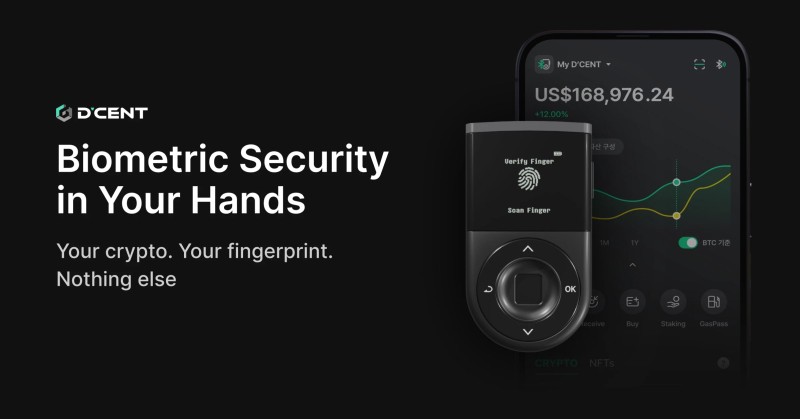
- D’CENT Biometric: ST33 EAL5+ chip, OLED, fingerprint access, Bluetooth and USB-C, phone apps, clear signing, and Blockaid threat detection across more than 50 listed chains.
- Ledger Nano X: ST33K1M5 EAL5+ chip, OLED, Bluetooth and USB-C, broad Ledger app support, clear signing, and a listed transaction-check feature.
- Trezor Safe 3: Optiga EAL6+ chip, OLED, USB-C, PIN access, clear signing, open-source firmware, and strong support for desktop and Android use.
- Tangem: Samsung EAL6+ chip, NFC cards, phone-passcode access, no built-in screen, no battery, and phone-based transaction checks. One source page lists more than 16,000 tokens.
- SafePal S1: EAL5+ chip, air-gapped QR signing, and more than 10,000 listed coins. The source gives less detail about its screen, apps, recovery, and firmware.
- Keystone 3 Pro: triple secure elements, fingerprint access, a 4-inch color screen, QR signing, clear signing, open-source firmware, and more than 5,500 listed tokens.
That is the short version. The longer version is that each device makes a different trade. A simple card can be lovely for a beginner who wants less hardware. A screen and air-gapped flow can be worth the extra steps for someone holding a large balance.
D’CENT Biometric: Fingerprints and Pre-Signing Checks
The source places D’CENT Biometric in the biometric-security and mobile-use lane. It has a fingerprint sensor, a PIN fallback, an OLED screen, Bluetooth, USB-C, and a companion app for iOS and Android. The fingerprint setup supports up to two fingerprints in the source.
Its listed security chip is an ST33 with EAL5+ certification. The device also decodes transactions and uses Blockaid to check some requests before signing. The comparison describes it as the only evaluated model combining fingerprint access, Bluetooth, and that threat-detection system.
D’CENT’s main trade
- Fingerprint access can reduce repeated PIN entry and shield a PIN from onlookers.
- The OLED gives you a separate place to inspect transaction data.
- Bluetooth and USB-C fit both phone and desktop workflows.
- Threat detection can help, but it does not catch every scam.
- The source lists closed firmware, so inspect the update and security details before buying.
The source pages show several D’CENT prices, including $89, $139, and $159. That inconsistency is a useful reminder: check the seller and model rather than trusting an old price line. A fingerprint may make the device feel friendlier, but the recovery phrase and every signed request still need your full attention.
Ledger Nano X: A Broad App and Device Ecosystem
The Ledger Nano X is the source’s all-round ecosystem pick. It has a small OLED, Bluetooth, USB-C, a PIN, clear signing, and a listed secure-element chip. The main reason to look at it is the Ledger Live application , which brings account views, staking, swaps, and other tools into one interface.
That matters because the device is only one part of the system. Ledger crypto support depends on the device model, the app, the chain, and the feature you want. A coin can appear in a portfolio view while a particular token, NFT, or contract action needs extra work.
Ledger Nano X facts
- Bluetooth and USB-C support mobile and desktop use.
- Clear signing shows more detail than blind signing.
- The source lists Transaction Check as an added warning tool.
- The cited price was about $149, but the seller’s live price should control.
- A 2020 customer database breach is listed in the source, which says no device breach was listed.
That database incident is worth separating from a private-key failure. Customer information and device keys are different things, but both can create risk. And do not mix model names. Some reviews discuss the Ledger Nano Flex instead of the Nano X, while the comparison here is about the Nano X.
Trezor Safe 3 and Tangem: Two Very Different Beginner Paths
The Trezor Safe 3 is the source’s open-source entry option. It uses an Optiga EAL6+ chip, an OLED, USB-C, a PIN, and clear signing. Its open-source firmware and support for desktop and Android make it a sensible fit for someone who wants a wired, inspectable setup. The source lists a price near $79 and limited iOS support.
Tangem takes the opposite route. It uses card-based hardware with no built-in screen, battery, or cable. A card taps to a phone over NFC, and the phone passcode helps authorize actions. Setup is described as taking less than two minutes. The trade is simple too: less hardware, but more reliance on the phone for transaction details.
Trezor Safe 3 and Tangem trade-offs
- Trezor gives you a hardware screen and a wired desktop workflow.
- Trezor firmware is listed as open source, while Tangem is listed as closed.
- Tangem has no device screen, so the phone must show the transaction.
- Tangem supports a broad asset list, but the source gives different counts on different pages.
- The Trezor Safe 3 is not the same product as the Trezor Model One named in another review.
- An Arculus vs Tangem wallet search needs exact model data that the supplied source does not give for Arculus.
For a first hardware wallet, I would pick the one whose daily flow you can understand. A screen-heavy device asks for more learning. A card-based device asks you to trust the phone display and check it with care. Neither is automatically safer for every person.
SafePal S1 and Keystone 3 Pro
The SafePal S1 is the lower-cost QR option in the source. It uses an EAL5+ secure element, supports more than 10,000 listed coins, and signs through QR codes instead of Bluetooth. The listed price was about $49, which makes it attractive for a tight budget.
The catch is missing detail. The supplied comparison does not give its screen size, app support, recovery design, open-source status, firmware details, or threat detection. Missing information is not proof of weakness. It is a reason to slow down and ask the maker more questions before sending a large balance.
Keystone 3 Pro goes the other way. It has triple secure elements, a fingerprint sensor, a 4-inch color touchscreen, clear signing, open-source firmware, and more than 5,500 listed tokens. QR signing removes a direct USB or wireless connection to a computer. The larger screen is meant to make transaction inspection easier, while the extra steps may feel slower to a new user.
Air-gapped-style signing choices
- SafePal S1 uses QR codes and a lower-cost hardware layout.
- Keystone 3 Pro uses QR codes with a larger screen and fingerprint access.
- Neither listed model includes threat detection in the source table.
- Keystone’s price is not provided in the supplied material.
Price and Budget
The cited cold-wallet range runs from about $49 to $200. That gap is not random. It can reflect a screen, a secure element, Bluetooth, biometrics, a larger display, or a broader app. The best cold wallet for a beginner is not always the one with the biggest number attached to it.
Compare the features that solve your actual problem. A person who uses a phone for daily activity may prefer Bluetooth. A desktop user may prefer USB-C. A card can be enough for a simple workflow. A large balance may justify a screen and a strict air-gapped signing process.
What each budget tier tends to offer
- Entry level: basic signing, a phone or wired connection, and fewer premium screen or security features.
- Middle range: better displays, Bluetooth, stronger app flows, or more secure-element choices.
- Premium level: biometrics, larger touchscreens, air-gapped signing, or broader portfolio tools.
Do not buy a device because its token count is huge or its box has a shiny sticker. Buy the one that supports your assets, shows transactions clearly, and has a recovery plan you can follow. If the price is unclear, check the official store or an authorized seller.
Paper, Metal, and Deep Cold Storage
Cold storage is not always a USB device. A paper wallet records a public address and private key on paper. A metal wallet or seed plate stores words or keys on metal for better fire and water protection. Both keep data offline, but neither can sign a transaction by itself.
Hardware adds the missing piece: a physical interface for reviewing and signing. Deep storage goes further by placing devices or keys somewhere hard to reach, such as a safe or a multisignature setup split across locations. That can lower routine exposure, but it also makes recovery and inheritance harder.
Cold storage formats
- Paper wallets are offline but easy to lose, tear, burn, or expose to water.
- Metal backups are more durable, but they still cannot approve transactions.
- Hardware wallets combine key isolation with a screen, buttons, and signing flow.
- Deep storage uses physical separation or multisignature approvals for harder-to-reach keys.
Beginner guide to crypto wallets and cold storage
Cold Wallet Setup Steps
Hey, don’t skip this part. The device does not protect you if the recovery phrase was exposed before it reached you. Buy from the maker, inspect the package, and let the device create its own phrase during setup.
Set up a new cold wallet
- Buy directly from the manufacturer or an authorized seller.
- Check tamper-evident seals and stop if the box looks opened or damaged.
- Charge the device or connect it according to its instructions.
- Download the official app from the maker’s site or an official app store.
- Start the maker’s setup process and create a new wallet.
- Write down the 12- or 24-word recovery phrase offline.
- Confirm every word and check that the backup is readable.
- Set a strong PIN or enroll fingerprints if the model supports them.
- Add the first blockchain account and receiving address.
- Send a small test amount before moving a larger balance.
- Install firmware and security updates through the official app or site.
- Store the device in a dry, secure place and protect the offline backup.
Checking Every Transaction
Cold storage can lower online key exposure, but it cannot tell you whether a transaction is sensible. The signing device gives you a trusted display. You still have to read it. This is the part where a little patience can stop a big mistake.
Check before you sign
- Compare the recipient address on the hardware screen with the request, character by character when practical.
- Check the amount, network fee, and blockchain network.
- Make sure a familiar token is coming from the network you think it is.
- Read token approvals. An approval can give a contract permission to move funds later.
- Read the contract action. A hash or short warning is not enough to understand a complex call.
- Stop if you did not start the request or cannot explain its purpose.
Don't sign a transaction you haven't checked.
Clear signing and threat detection can help, but neither replaces judgment. A warning may be wrong, incomplete, or bypassed. A phone screen can also be altered by malware. That is why the hardware’s own display matters, especially for a cold wallet with no built-in screen.
Common Security Mistakes
Most cold-wallet losses come from a bad purchase, a leaked backup, or a transaction approved without thought. The device may be fine while the surrounding setup fails. These are the recurring failures in the source material.
Security mistakes that cost money
- Buying a used or counterfeit device with a pre-written recovery phrase.
- Photographing, screenshotting, emailing, or saving the recovery phrase online.
- Ignoring the recipient, amount, network, fee, or contract purpose.
- Approving an unfamiliar transfer, token permission, or link-generated request.
- Skipping firmware updates or downloading them from an unknown site.
- Sharing a recovery phrase with a fake exchange, wallet, or support agent.
- Keeping only one paper backup where fire, water, or theft can reach it.
- Connecting a wallet to random sites, apps, or browser extensions.
- Assuming a crypto wallet has bank-style customer service or password recovery.
- Using an in-app swap without checking the rate, spread, and network fee.
None of this means every exchange, hot wallet, or hardware maker is unsafe. It means each one has a job and a failure mode. Know which part you are trusting, and do not ask one small device to solve problems it was never built to solve.
Who Holds the Keys?
A custodial wallet gives a third party control of the private keys. An exchange account is the common example. The exchange holds or manages the keys and gives access under its own rules. It may use cold storage itself, but you still depend on its security, uptime, account controls, and legal structure.
A non-custodial wallet gives you control of the keys or recovery phrase. No exchange can move your assets merely because it controls an account database. The trade is direct control: you must protect the phrase, check recipients, and choose the right network.
Custody choices
- Custodial: a provider controls the keys and access rules.
- Non-custodial: you control the keys and recovery information.
- Self-custody: you accept responsibility for backups, devices, and transaction checks.
- Mixed custody: use an exchange or hot wallet for activity and a cold wallet for longer-term holdings.
If you don't have your keys, you don't have your bitcoin.
That does not make an exchange bad by default. It makes the trade visible. A mixed setup can give you quick access for small amounts and self-custody for long-term holdings. It also gives you more devices, backups, and rules to manage.
Can a Cold Wallet Be Hacked or Lost?
A cold wallet can still be stolen,counterfeited, tricked into signing a bad request, or damaged. A tampered package, compromised firmware, exposed recovery phrase, and social engineering are all real risks. The source says losses tied to exposed phrases and malicious signing are more common in the described material than direct attacks on the secure chip.
If the device is lost, the balance stays on the blockchain. A compatible wallet can be restored with the recovery phrase. Another brand may work when it supports the same standard and derivation path. If the device and every valid copy of the phrase are gone, the funds may be unreachable.
That is why I want two offline backup copies in separate safe places. One copy can burn, get wet, or disappear with the device. Two copies give you a better chance, and neither copy should sit in a photo album or email draft.
Is Cold Storage Useful for Small Balances?
It can be, but the cost may not make sense for every small balance. One guide says a well-secured hot wallet may be enough below $100, while another says there is no strict minimum. The amount is only one part of the choice.
Think about how often you need the money, how much a mistake would cost, and whether you can manage the device and backups. A small spending balance can stay hot. A larger long-term balance can sit in cold storage. A mixed wallet setup gives you a middle path without forcing every dollar into the same place.
A Simple Care Schedule for Your Cold Wallet
Cold storage is not “set and forget.” The device, backup, apps, permissions, and signing habits all need a quick look now and then. Ten minutes on a regular schedule is easier than recovering from a stale backup or an approval you forgot about.
Keep a light maintenance rhythm
- Each month: check recent transactions, token approvals, connected sites, and the readability of your offline backup.
- Every few months: test the device and app connection, review changed permissions, and check that required assets still appear.
- Every six to twelve months: check firmware, backup copies, emergency instructions, and access for any multisignature signers.
- Always: download updates from the maker, use a strong unique PIN, and never share the recovery phrase.
- Store the device dry and secure, such as in a fireproof lockbox, home safe, or safe-deposit box.










Comments on “Compare the Best Cold Wallets by Security, Experience, and Budget”
No comments yet. Be the first to share your thoughts.