
What Is a Trezor Wallet
So you asked me how does trezor wallet work. This is a question I get a lot from friends who have recently fallen down the weird internet money rabbit hole. Trezor is a brand that makes these little gadgets that keep your crypto from evaporating. They actually built the first-ever hardware wallet for crypto, which is a pretty big deal when you think about it. The simple version: a Trezor is a physical doodad you plug into your computer. It holds your private keys offline, so any garbage malware on your PC can't snatch them. Hooray for physical doodads.
When I say a digital cryptocurrency wallet , I just mean any tool that stores the keys to your coins. But Trezor isn't some app on your phone-it's an actual piece of hardware. Why does that matter? Because if the keys live on the device, the malware partying on your PC can't touch them. I like to think of it as a tiny lockbox for your loot. You toss it in a drawer or carry it around, and only plug it in when you actually need to move money.
Two main Trezor models
- The Trezor One is the no-frills, cheaper model that handles Bitcoin, Ethereum, and a bunch of alt coins.
- The Trezor Model T steps it up with a touchscreen, a faster chip, and support for even more coins.
- Both are open source, meaning any paranoid person can read the code and hardware blueprints.
- Both keep your keys locked inside the device, never chilling on your computer.
Some folks shopping for the the best crypto wallets hardware end up with Trezor because it's easy and open. I'm not the company-just a guy who read the docs and played with one. The the most secure hardware wallet crown gets tossed around a lot, but Trezor is definitely in the running for normal humans. It doesn't secretly phone home or hide sketchy code. You can read every single line if you're so inclined.
Anyway, here's the core of how does trezor wallet work: you draft a transaction on your computer, the Trezor shows it on its little screen, and you press a button to confirm. No key ever leaves the device. That's the whole ballgame. Your computer shoots over a request, the device signs it in solitary confinement, and hands back the signed blob. Your secret stays off the internet. Beautiful.
I should mention that Trezor is a a reputable crypto wallet pick for newbies. Setup walks you through scribbling down a recovery seed-a list of words that can resurrect your whole wallet on a fresh device. Lose the device, buy a new one, type in those words, and boom, you're back. But lose the words, and nobody can save you. That part is 100% on you.
Trezor One and Model T
Let's dig into the two models a bit. The Trezor One is the older sibling but still totally solid. It's got two buttons and a tiny screen. You can manage Bitcoin, Ethereum, and a pile of other assets with it. The interface is bare-bones, which I personally love. No fancy menus, just clear steps. You click through addresses and confirm sends with a button tap.
The Model T cranks it up with a color touchscreen and a zippier chip. It supports more coins right out of the box. But both share the same security DNA. And both let the community poke at the firmware. That open-source bit is huge for trust-you don't have to take some faceless corporation's word for it. If a bug pops up, people can see it and fix it quick.
Both devices are open-source, allowing the community to audit the hardware designs and firmware for transparency.
If you're comparing hardware wallets for crypto , Trezor is usually on the list. I'm not gonna debate arculus vs tangem wallet today, but Trezor has history on its side-it was the first of its kind. The Model T costs more, but for a lot of people the One is plenty. I started with the One and still use it for my petty cash crypto.
One more thing: these devices are small. They fit in your palm. You can stash them in a safe or even inside a book (weird but okay). The whole point is to keep the key away from your daily computer. That's how does trezor wallet work in real life-you don't leave keys sitting on a hot machine that's one infected download away from disaster.
Trezor Safe 3 unboxing and first setup
How SegWit Helps Your Coins
Now for a little tech detour. SegWit stands for Segregated Witness (yes, really). It's a protocol upgrade that peels the signature data off the main transaction. This lets more transactions cram into a block and nudges security up a notch. Trezor Wallet uses SegWit for Bitcoin and Litecoin, so if you hold those, you get the perk.
So how does trezor wallet work with SegWit? It spits out addresses that are cheaper to use. You pay lower fees when you send coins, and signing big transactions is faster. That's a genuine win for anyone moving funds regularly. The network gets less congested, and your wallet feels snappier.
I think of SegWit like a tighter packing method for data-less waste, more room. If you've ever wondered about a reputable crypto wallet that supports this, Trezor does it by default on standard accounts. No hidden switch buried in menus. It's just on.
Old-timers might recall when SegWit was fresh and some apps choked on it. Those days are gone for Trezor. The firmware handles it cleanly. And if you mess with Litecoin, same story: standard accounts use the new format, keeping your costs down.
Standard and Legacy Accounts
Trezor Wallet hands you two account types. The standard one has SegWit turned on-it's the default these days. The legacy one is the pre-SegWit old style. Your coins are accessible in both, but legacy misses out on the fee savings. You can run both at once, no problem.
Standard account traits
- Uses the new address format (P2SH) so you can tell it apart from legacy.
- Bitcoin standard addresses start with the number 3.
- Litecoin standard addresses may start with M or 3.
- You get cheaper fees and faster signing.
Legacy account traits
- Bitcoin legacy addresses start with 1.
- Litecoin legacy addresses start with L.
- Old history stays viewable and usable.
- Some third-party apps only work with legacy until they add SegWit.
When I check how does trezor wallet work for my own coins, I mostly use standard. But I keep a legacy account around for weird old apps. The best way to keep your crypto safe includes not mixing up these account types by accident. Sending from legacy to standard is fine, but watch the address prefix so you don't paste a wrong-chain address.
Also, standard accounts show more info through outside tools, which helps if you use a block explorer or a watch app. Legacy is fine, just a bit dated. I'd slowly move funds to standard if you care about fees. No rush, though.
Address Formats and Derivation Paths
The difference between account types shows up in something called derivation paths. Think of these as the routes that generate your addresses. Legacy uses BIP44, standard uses BIP49. I won't bore you with the deep math, but the path changes how your address looks. It also changes the type of extended public key you export.
Derivation paths
- Legacy first account: m/44'/0'/0'
- Legacy second account: m/44'/0'/1'
- Standard first account: m/49'/0'/0'
- Standard second account: m/49'/0'/1'
These paths also decide the extended public keys you export. That matters when you hook up other apps. Understanding how does trezor wallet work under the hood helps you avoid sending to the wrong account type. If an app expects legacy and you hand it a standard address, it might not see your funds. So match the path.
The good news: Trezor Wallet shows you which path an account uses. You don't have to memorize the string. Just know that 44 means old, 49 means new for Bitcoin. Litecoin uses the same idea with its own coin code. Simple enough.
Extended Public Keys (XPUBs)
An XPUB is an extended public key. It lets a watch-only app see your balance and transactions without touching your private keys. Trezor shows different XPUB types based on coin and account. You can find them in settings under basic info.
XPUB types you may see
- xpub = Bitcoin legacy
- ypub = Bitcoin standard SegWit
- ltub = Litecoin legacy
- mtub = Litecoin standard SegWit
You might import these into Electrum or a watch-only tool like Sentinel. That's part of how does trezor wallet work with outside software. A safest online crypto wallet claim is bogus if it exposes keys; XPUB only shows public info, so it's fine. Someone with your xpub can see your moves but can't spend. Still, keep it from prying eyes since privacy matters.
If you use a watch app, the app builds a view from the XPUB. Trezor never sends the secret. The device stays offline while you check balances on your phone. That split is the entire point of a hardware wallet-you get convenience without handing over the crown jewels.
Trezor Safe 5 setup with color touchscreen
Turning On SegWit in Your Trezor
If you've got old legacy coins and want those cheap fees, you can move them to a new standard account. The steps are simple but need care. I walked through this myself and it took a few minutes per account.
Steps to enable and use SegWit
- Update firmware to version 1.5.2 or later.
- Open the official Trezor Wallet app.
- Pick the coin, Bitcoin or Litecoin.
- Make a new standard account and copy its receive address.
- Send funds from legacy to that new address using the Send screen.
- Make more standard accounts if you want separate piles.
- Use the new account for all future moves to get lower fees.
Hey, don't skip the firmware update part. That's important. Old firmware might not support the new paths. The whole point of how does trezor wallet work smoothly is staying updated. The device nudges you when an update is out. Just follow the prompt and confirm on screen.
No special cable is needed; the XPUB is sufficient.
After you move coins, the legacy account still shows old history. That's okay. You can leave it empty or reuse later. I prefer to label accounts so I know which is which. Trezor lets you name them in the app. Small thing, big help.
One caution: when sending from legacy to standard, double-check the address on the Trezor screen. Malware can swap clipboard addresses. Your eyes on the device are the final guard. That's how does trezor wallet work against tricks: you verify on the trusted display.
Keeping Some Privacy
Trezor handles privacy per account. If you lump many legacy accounts into one standard account, you merge transaction graphs. That can hurt your privacy. Outside watchers can link stuff you wanted separate.
I suggest keeping separate accounts for separate uses-say, one for savings, one for spending. This is a small habit that makes a digital cryptocurrency wallet usage smarter. How does trezor wallet work with privacy is just giving you the tools; you gotta use them right. Don't consolidate everything into one bucket unless you mean to.
If you get paid in crypto for work, maybe use a fresh standard account per job. Then move to cold storage later. That keeps the payer from seeing your whole stack. The device won't stop you from mixing, so your brain must.
Using Trezor With Electrum
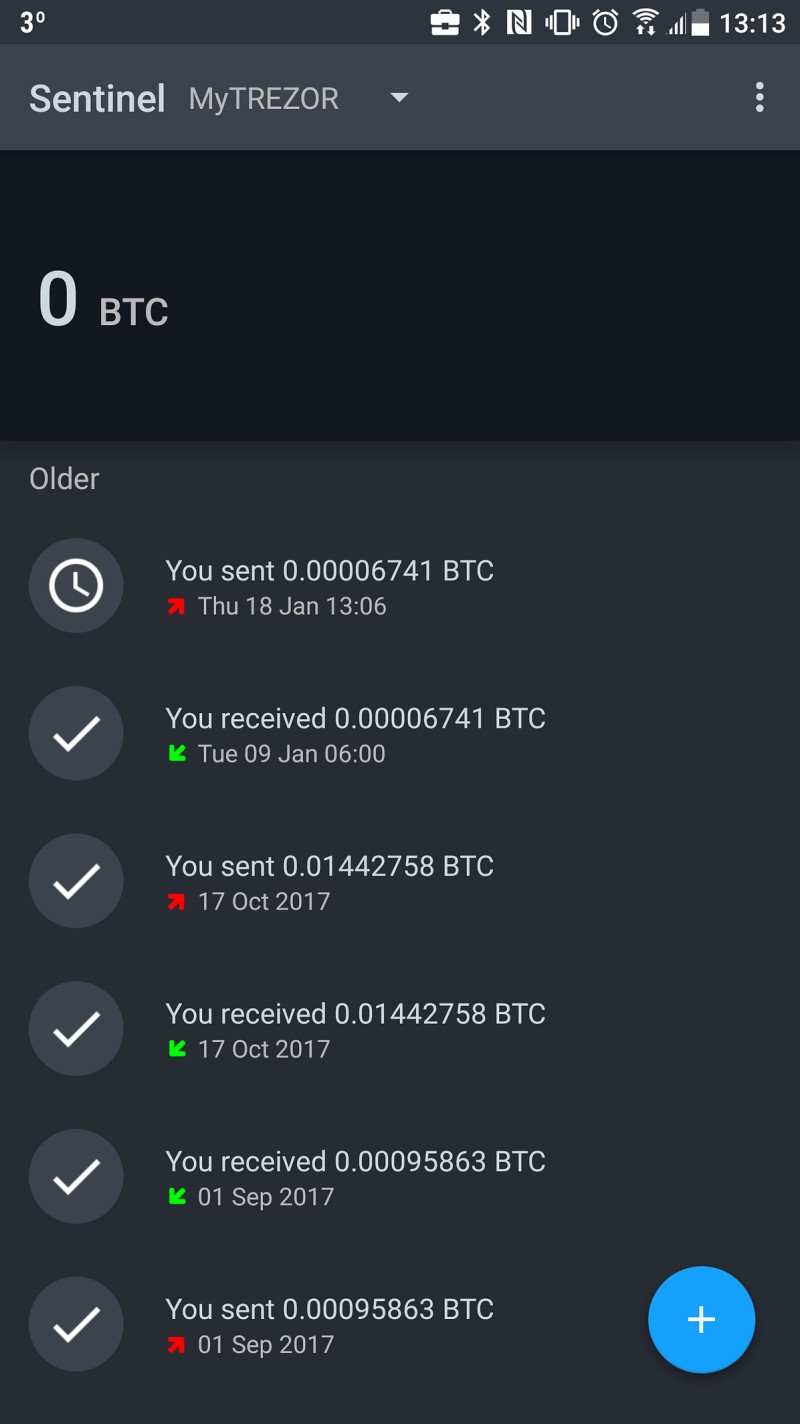
Electrum is a popular Bitcoin wallet app. Version 3 added native SegWit support. You can hook your Trezor to it for a full signing client. This means Electrum builds the tx, Trezor signs, and Electrum broadcasts. Nice combo for advanced users.
Electrum setup steps
- Get Electrum from electrum.org to avoid fake copies.
- Create new wallet, pick Standard wallet type.
- Choose Use a hardware device and select Trezor.
- Set derivation path: m/49'/0'/0' for SegWit, m/44'/0'/0' for legacy.
- Confirm on device with PIN or passphrase.
- Check addresses match Trezor Wallet display.
After that, Electrum signs with the Trezor as the secure brain. That's another layer of how does trezor wallet work with third-party apps. Some folks ask about a ngrave crypto wallet , but Electrum works with Trezor just fine. The app never sees your seed-it just asks the device to sign what you approve on screen.
Just be sure you download the real app. Fake malware installs are a thing. I always double-check the URL. And when Electrum shows an address, compare it to the one on Trezor. If they differ, stop. That's the beauty of a hardware wallets for crypto setup: the device tells the truth.
You can run many wallets this way. The Trezor is the key vault, the app is the clerk. The clerk can't open the vault alone. That's a solid split for daily use.
The Passphrase Trick
Here's a powerful feature. A passphrase adds a hidden wallet on top of your recovery seed. Think of it as a second secret that opens a separate locker in the same device. Backup alone gives the standard wallet. Backup plus passphrase gives a hidden one.
The passphrase is never stored on the Trezor hardware or in the accompanying software.
If you forget the passphrase, the funds are gone for good. No one can recover it. So this is advanced. But it adds a strong self-managed layer. How does trezor wallet work with passphrase? It derives a unique hidden wallet from seed plus passphrase. Each different passphrase makes a different wallet. A typo creates a new empty one, not your coins.
Passphrase rules to know
- Any chars, max about 50 bytes, case sensitive.
- Spaces count as valid characters.
- Wrong entry makes a brand new empty wallet, not your funds.
- Don't use simple stuff like "password" or "12345".
I keep my passphrase mostly in my head. If you write it, keep it away from the seed. A d cent cold wallet is another option some mention, but Trezor's passphrase is built in. The best way to keep your crypto safe often includes this extra secret. It protects you if someone finds your seed but doesn't know the phrase.
Storage tips from the docs: prioritize memorization. Writing it down increases exposure. If you must write, follow seed rules: offline, secure, separate from seed. Some hide it among personal items a thief wouldn't check. A safe deposit box works too. Share only with someone you trust for inheritance, and teach them how to use it.
Passphrase is not stored on the device, so even if someone seizes your Trezor, they can't extract it. The device uses it only at input time. That's a key point. It's an advanced feature for folks comfortable with self-custody. Don't use it if you're scared you'll forget. Plain seed is enough for many.
Watch Only With Sentinel
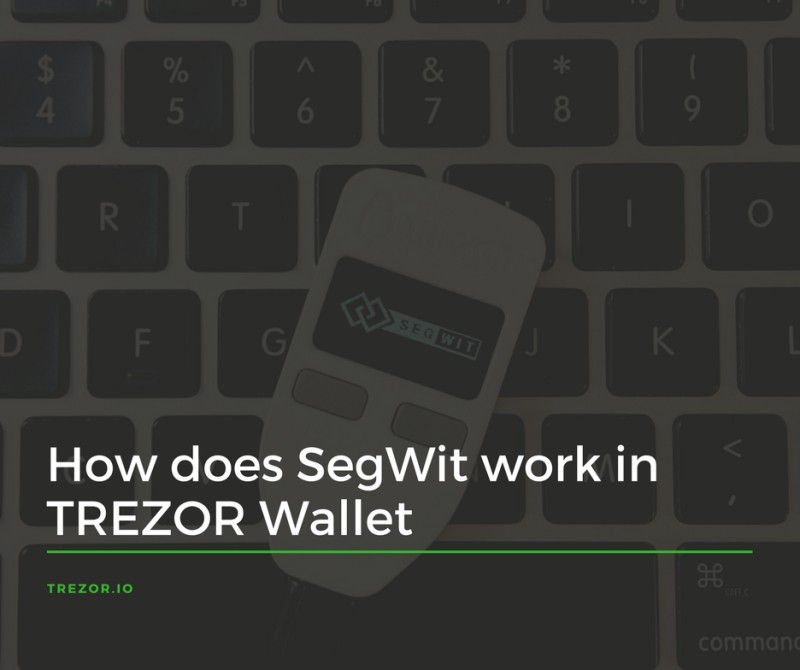
Sentinel is an Android app by Samourai Wallet. It lets you watch a Trezor Bitcoin account without the device. Good for checking balance on the go. You don't need to carry the hardware or a computer.
What Sentinel does
- Monitors balances and tx history with just XPUB.
- Accepts payments without carrying your computer.
- Never sees private keys, those stay on Trezor.
- Open source code, so you can audit it.
To set it up, install from Google Play, pick account type, scan the XPUB QR from Trezor Wallet. Then you see your coins move. This is a neat part of how does trezor wallet work with mobile tools. It's like a window, not a door. The app gets public keys to build a view, so your tx history is visible to the app, but not your spend power.
Remember it shows your tx history to the app, but not your keys. That's a tradeoff I accept for convenience. You can add an app lock so a friend borrowing your phone can't peek. Both legacy and SegWit accounts can be monitored. No special cable, just the XPUB string or QR.
I use Sentinel when I'm away and want to confirm a payment arrived. It saves me pulling out the Trezor and laptop. But for any send, I still go to the real device. That's the rule.
Multi Key Vaults Via Casa
Some people want more than one device. Casa offers multisig vaults that use Trezor plus other keys. The idea is no single point of failure. You spread trust so no one hack sinks you. This is called defense in depth.
Vault configs with Trezor
- 3-Key Vault: 1 Trezor, 1 mobile key, 1 Casa recovery key, need 2 signs.
- 5-Key Vault: 3 hardware wallets (e.g., Trezors), 1 mobile, 1 Casa key, need 3 signs.
- Casa recovery key sits on their servers with encryption.
- Mobile key uses strong crypto on your phone.
This setup means an attacker needs to compromise at least two parts. How does trezor wallet work inside Casa? It just signs its share when prompted. The most secure hardware wallet becomes one of many locks. I find that comforting for big holdings. If your Trezor is lost, the other keys still guard the cash.
If your crypto is life-changing money, a 5-key vault makes sense. For small amounts, a single Trezor is fine. It's about risk. Casa can help with inheritance planning too, so heirs can access if you're gone. That's a soft spot for self-custody, and multisig with a recovery key eases it.
The Trezor provides a hardware-rooted private key. Casa adds logic and a fallback. Even if malware grabs your mobile key, it still can't move funds without the Trezor or the recovery key. That's the power of multiple signs.
CNET explains crypto wallet basics
Why Add More Keys
Redundancy is the name of the game. If one key is lost or stolen, your assets stay put. You spread trust so no single bug sinks you. A multisig vault means no single compromised key is enough to move assets.
No single key can move funds alone.
Malware or phishing might grab one key, but the rest block the move. That's why a reputable crypto wallet combined with multisig is strong. How does trezor wallet work with Casa? It adds hardware-rooted trust to the mix. The device signs only when you confirm on its screen, so remote theft is hard.
I also glance at safest online crypto wallet claims, but online ones can't match a device plus multisig. Hardware beats hot storage for self-custody. When the stakes are high, use different hardware types if you can. That lowers the chance one flaw hits all keys. Trezor plus another brand in a 5-key vault is smart.
Casa's recovery key gives a fallback after ID check. So you won't lose everything if you misplace hardware. That safety net is worth a look for large stacks. But it does mean trusting Casa a bit. Weigh that against pure self-rule.
Fault Injection Attacks on Trezor One
Now for a geeky bit. Researchers demonstrated a fault injection attack on Trezor One. They mess with the hardware to drop security level and read memory. This needs physical access and precise timing, so it's not a casual hack. Still, good to know the limits.
The Trezor One uses an STM32F2 chip with read protection. Attackers glitch the power lines to bypass that. They can then read SRAM. Newer firmware moves seeds to secure flash, so the hit is less bad. Still, good to know.
Glitch techniques used
- Clock glitching: spurious clock pulse to skip instructions.
- Voltage glitching: brief power dip to force undefined state.
- Electromagnetic fault injection: EM field to flip bits.
- All need physical access and exact timing.
This is deep-end stuff. For most of us, how does trezor wallet work in daily life is unaffected. But if you're a target, keep firmware updated. The hardware wallets for crypto space learns from these studies. The open-source docs let defenders patch fast. I sleep fine knowing the seed isn't in RAM on new versions.
Open source helped both attackers and defenders. Schematics are public, so fixes come fast. I'm not scared, just informed. The attack needs desoldering caps, a ChipWhisperer, and a steady hand. Not something a random thief does on the bus. It's lab work.
If you run a Trezor One, just update when asked. The fix moves secrets to flash. That blunts the glitch. Model T uses different chips with stronger protection too. So the line keeps getting better.
How the Glitch Attack Works
The attack boots the device with reset held, then about 170 microseconds in, they pull a power line low. That interferes with the protection check. Then they get debug access and dump memory. It's a tiny window, measured in microsecond slices.
The descriptor matches the expected C struct in the firmware, confirming that the internal RAM was successfully accessed.
They desolder capacitors, add test pads, use a ChipWhisperer to make the pulse. It's lab gear, not script kiddie stuff. This shows how does trezor wallet work security is a cat-and-mouse game. The researchers shared code and schematics so the maker could harden things.
I won't build one, but I respect the research. It pushed Trezor to store seeds safer. That's a win for users. The attack also needed fixing USB re-enumeration bugs in the script. Timing had to shift to land the glitch right. All very precise.
After access, they could read SRAM, which on old firmware held seed. New firmware keeps seed in secure flash, so the dump shows no key. That's the key takeaway: update. The hardware glitch can't pull what isn't there.
Staying Safe With Hardware
At the end of the day, a Trezor is a solid pick. Keep firmware fresh, use passphrase if you can handle it, and consider multisig for big sums. That's the practical wrap. The device does the heavy lift of key isolation.
When someone asks me how does trezor wallet work, I say: it keeps keys offline, shows you the tx, and lets you confirm with a press. Add SegWit for cheap fees, XPUB for watch-only, and Casa for extra keys. Simple as that. You don't need a degree to use it, just care.
Compare with a ngrave crypto wallet or others if you like, but Trezor's open roots and long history make it a best crypto wallets hardware choice for many. Stay calm, keep your seed safe, and your weird internet money stays yours. I've covered the basics and the deep cuts, so you can dig more on your own terms.











Comments on “How Does a Trezor Wallet Work? A Guide to Keeping Your Weird Internet Money From Evaporating”
No comments yet. Be the first to share your thoughts.